An AFL scoreboard graphic must show each team's score as goals, behinds and a running total, the quarter, and a clock that stops and starts on the umpire's signal rather than counting to a fixed end time. On a broadcast the same graphic is called the scorebug. Australian rules is the only major football code that carries three numbers per team, and one of very few where nobody watching knows when the quarter will end.
That is why an AFL scoreboard cannot be built by relabelling a soccer template. Every other football code puts one number per team on the score line. Australian rules puts three, and only one of them decides the match. The clock records playing time rather than elapsed time, so an overlay that derives it from the opening bounce is wrong within the first minute and never recovers. This page is part of the master scoreboard graphics guide.
What an AFL scoreboard must show
| Element | Why it matters | Source of data |
|---|---|---|
| Score as goals, behinds and total (12.7.79) | A goal is six points, a behind is one. The score reads 12.7 79 and the total is what the viewer takes in first. | Official feed, otherwise a scoring app |
| Quarter indicator | Four periods, not two halves. Q1 to Q4, plus extra time in finals. | Match state |
| Quarter clock | Playing time, not elapsed time. Stops and starts on the umpire's signal to the timekeeper. | Timekeeper, via feed or operator |
| Time-on state | Without it, a stopped clock reads as a broken graphic. | Clock state flag |
| Team abbreviations and guernsey colours | A three-letter code on a colour plate stays readable where a crest does not. | Team record |
| Competition branding | League or finals identity, and the sponsor position that funds the production. | Competition configuration |
| Disposals and interchange count | Optional. Kicks plus handballs is the sport's volume stat; rotations are capped, so the count is news. | Stats feed or scoring app |
The clock is the hard part
An AFL quarter is twenty minutes of playing time plus time on. The timekeeper stops the clock at every stoppage: after a goal, when the ball goes out of bounds, for an injury, at every ball-up. That stopped time is not lost, it is simply not counted, so a twenty-minute quarter routinely takes closer to half an hour. Three things follow, and all three break bugs built for other sports.
You cannot derive the clock from timestamps. There is no formula from the opening bounce to the current clock value. The clock is a fact reported by the timekeeper, and the graphic has to receive it and hold it. An overlay that calculates elapsed time locally drifts out at the first stoppage and the error compounds for the rest of the quarter.
There is no known end time. Because the amount of time on is not decided in advance, nothing can count towards the siren. Automation that fires a graphic two minutes before the end of a quarter has nothing to count towards. Quarter-end automation has to be triggered by the period-ended event itself, never scheduled against a clock.
The running or stopped state is information. A viewer looking at a clock that has not moved for fifteen seconds needs to know whether that is the sport or the stream, which is what the small time-on marker beside the clock is for.
Clock direction is a competition setting rather than a design decision. AFL broadcast convention is a countdown of the playing time remaining in the quarter, while plenty of state league, community and junior competitions count up from 0:00, many of them with fixed-length quarters and no time on at all. The digits have to be tabular and fixed width so the clock does not shuffle sideways when 9 becomes 10, and clamped so it never goes negative or past the period boundary.
Scoring events and what the bug does
Australian rules has two ways to score and four ways to arrive at one point, which is more nuance than a score line alone can carry.
- Goal, six points. Kicked between the two big posts without being touched. This is what the celebration graphic exists for: scorer, team, quarter and quarter time, with a career total appended on a milestone.
- Behind, one point. Between a big post and a small post, or touched through. A behind is not a goal with a smaller number on it, it is a different event with different weight, and it needs a shorter, quieter treatment. Re-using the goal animation for one point is the commonest mistake in Australian rules scoreboard graphics.
- Rushed behind, one point. Forced through by a defender. The score increases and nobody is credited, so the bug has to add a point with an empty scorer field rather than showing a blank name plate.
- Touched on the line, one point. The ball crossed between the big posts but was touched. The crowd has just seen it go through the goal, so the graphic has to explain why the score went up by one, not six.
- Score review. A scoring decision referred for video review. This is the case that exposes naive bugs: a review can turn a goal into a behind, so the total has to be able to go down by five. Most scorebugs only ever increment. Hold the score flash while the review is live, then animate once to the ruling.
The layout consequence is easy to underestimate. Six numbers plus a separator is a lot of horizontal space, and the widths change during the match: 8.12 60 becomes 20.15 135 by the final siren. Reserve the columns for the widest plausible value from the first bounce, or the bug shifts every time a team kicks its tenth goal. The invariant is worth asserting inside the graphic: total equals goals multiplied by six, plus behinds.
A kick-in follows every behind and is the moment possession changes, so a brief indicator naming the kicking team earns its place. Ball-ups and throw-ins can be a small badge, but neither should block the live picture.
Free kicks, penalties and player counts
Australian rules has no cards and no sin bin. Nobody is temporarily removed from the field, so an AFL bug carries no player-count pill and no suspension countdown, an entire class of persistent state that rugby league, ice hockey, futsal and handball bugs all have to maintain. That width goes to the three score numbers instead.
What replaces it is a set of free kick overlays where the reason is the story. A 50-metre penalty advances the player fifty metres and usually turns a neutral position into a shot at goal, so it needs the reason on the badge, and it has to wait rather than collide with the goal graphic that often follows seconds later. Deliberate out of bounds gets a small banner naming the team receiving the free kick. Dangerous tackle and high contact carry the reason, the offending player and the report status. Generic free kicks should stay producer-selected, or the bug would be permanently obscured.
The two substitution types need to look different. An interchange is a rotation through the gate: the player can return and it counts against the cap. A medical substitution is one way, does not affect that count, and should carry a medical icon rather than the standard arrows. An injury stoppage stops the clock, so the time-on state activates as the medical banner appears.
Extensions: the stats worth putting on the bug
A scorebug extension is a stat panel that pops out of the bug, on a milestone in auto-mode or on demand from the operator. The test: does the stat change how you read the next thirty seconds? For Australian rules:
- Disposals, home against away. Kicks plus handballs, the single number that shows which side is getting the ball.
- Goal-kicker leaderboard. Two columns, updated on every goal, sorted by goals. The most requested graphic in the sport after the score itself.
- Disposals leaderboard. Top players per team with the kicks and handballs split shown, so the totals can be checked by eye.
- Milestones. Games played and career goals, fired once on crossing and styled apart from the goal celebration so the two never read as the same event.
- Best on ground. Post-siren only, with the statistics that justify the selection.
A finals bracket, crowd attendance and venue are worth having as producer-triggered cards. Extensions can carry a sponsor position, which is often what turns a graphics package from a cost into revenue.
How LIGR drives an AFL scoreboard
The central question for any Australian rules production below the top tier is where the data comes from, because there is usually no official feed at all. LIGR takes an official feed where one exists and uses the LiveScore app where one does not. The graphics are identical either way. In the app the operator presses the buttons for real events, goal, behind, interchange, free kick, and the graphics update automatically. Every press is timestamped, which is what makes the stat extensions and automated highlights possible. Below the elite level, the scoring app is the feed.
The graphics are designed in Rive and bound to live data in FUSE, so goals, behinds, total, quarter, clock and time-on state are variables rather than baked artwork. A new competition, a finals skin or a different sponsor is a theme change, not a rebuild, and it renders in HTML5, so there is no graphics machine at the ground.
Game Plans handles automation: pre-match sequences, event-triggered graphics, break playlists and live playlists. Because there is no predictable quarter end time, the useful triggers are the events themselves rather than clock offsets. Where a producer wants a human in the loop, the Control Room gives manual control of the same graphics, and auto-mode runs the package with no operator at all.
LIGR's Australian rules graphics are live in production. See the AFL project and the SANFL project, and the other codes on the sports pages.
Every function, live
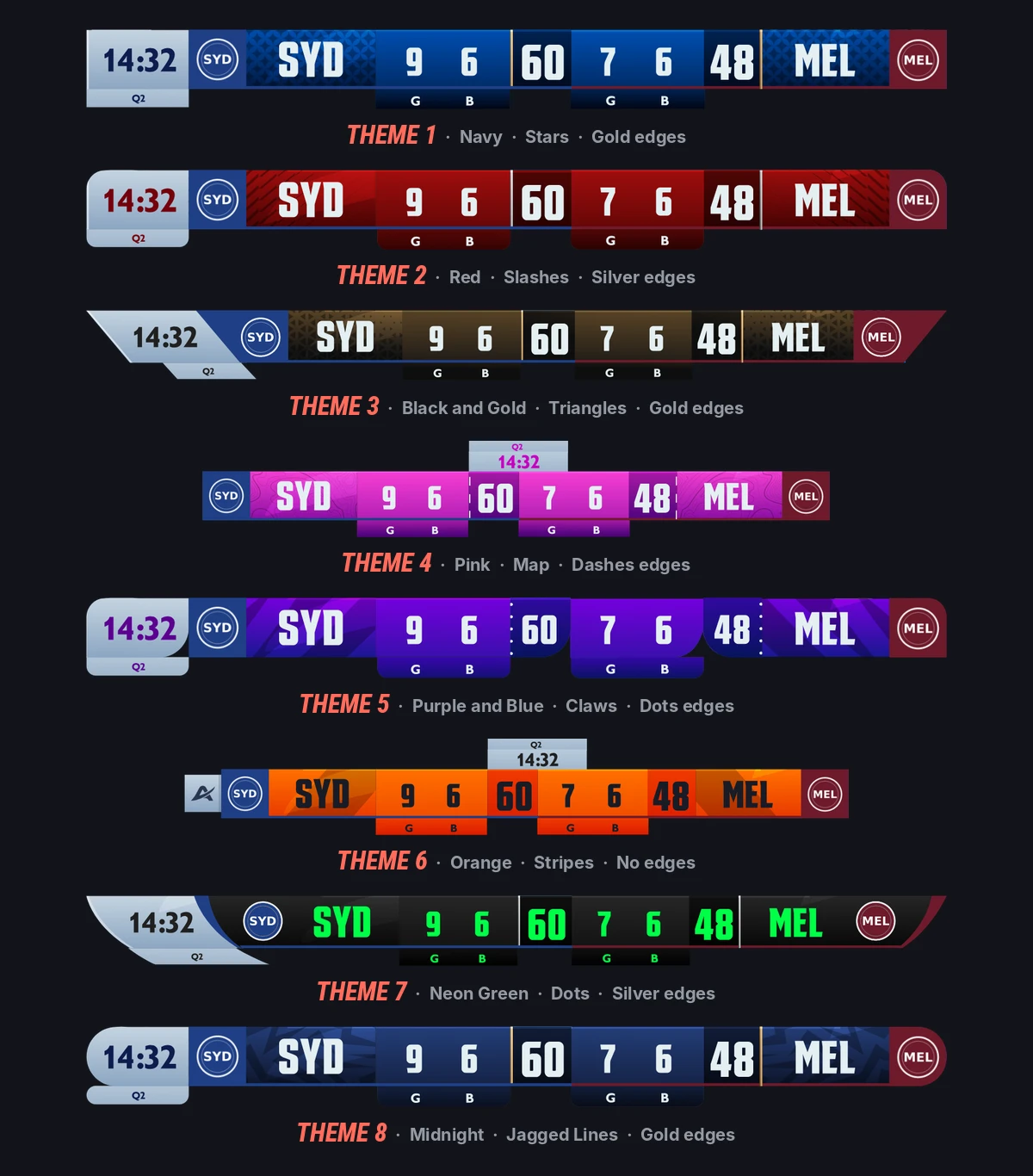
The extensions above are the states this scorebug carries. Each fires from a single data change.
Frequently asked questions
What is an AFL scoreboard overlay?
An AFL scoreboard overlay is the graphic laid over a live Australian rules broadcast or stream, and the small persistent version of it is also called the scorebug. It has to carry each team's score as goals, behinds and a running total, the quarter, and the quarter clock with a marker showing whether time on has stopped it. Team abbreviations on guernsey colours and a competition or sponsor position complete it, with disposals and the interchange count as optional extras.
What does an AFL scorebug need to show?
At minimum: both teams' scores in goals and behinds (for example 12.7) with the running total, the quarter, the quarter clock, and an indicator showing whether the clock is running or stopped for time on. Team abbreviations with guernsey colours and competition branding sit alongside. Disposals and the interchange count are optional additions on an extended bug.
Why does an AFL score have two numbers and a total?
Australian rules has two scoring outcomes. A goal, kicked between the two big posts without being touched, is worth six points. A behind, between a big post and a small post or touched through, is worth one. The convention is goals, behinds, then the total, so 12.7 79 means twelve goals and seven behinds: twelve times six plus seven is seventy-nine.
What does time on mean on an AFL scoreboard?
Time on refers to the periods when the timekeeper has stopped the clock during a stoppage: after a goal, at a ball-up, for an injury. That time is added to the quarter rather than counted against it, which is why twenty minutes of playing time usually takes around half an hour in real time. The scoreboard marks the state so viewers know the clock has not frozen.
Does the AFL clock count up or down?
It depends on the competition, which is why clock direction should be a setting rather than hard-coded into the graphic. AFL broadcast convention is a countdown of the playing time remaining in the quarter. Many state league, community and junior competitions count up from 0:00 instead, and a large number play fixed-length quarters with no time on at all.
Can an AFL score go down?
Yes. A score review can overturn a goal to a behind, which reduces that team's total by five points, or rule no score at all. An AFL scoreboard therefore has to handle a decreasing total, not just increments. The safe pattern is to suppress the score flash during a review and animate once to the confirmed ruling.
Can you run an AFL scoreboard without an official data feed?
Yes, and below the elite level you usually have to. LIGR uses an official feed where one exists and its LiveScore app where one does not. An operator records goals, behinds, interchanges and free kicks as they happen, the graphics update from those events, and every event is timestamped so stats and highlight clips come from the same input.
Put a proper AFL scoreboard on your broadcast
Cloud-native graphics, no hardware at the ground, one operator or none.